Product roadmap
What we shipped, and what is next
A public list of research writing work, updated from June 12 onwards. Suggest a feature anytime.
September and October 2026
One early release each week through the end of October. All of these are live now.
Research
Early release doneMulti-run qualitative coding with Cohen’s Kappa and cosine similarity. Bring your own API key (Gemini, Claude, GPT, and more). Built with Aza Lab at Yale.
Early release donePaste gene counts, get a cell sentence and a cell-type call. Runs in the browser.
Early release doneAlphaFold viewer and Cell2Sentence in one place for biology papers.
Early release doneHugging Face Daily Papers. Open any paper in paperclub.
Integrity and venues
Early release doneOverlap check against published papers and preprints. Included with Pro.
Early release doneJapanese and Spanish trackers, plus AI, NLP, CV, and ML field pages.
Community
Early release donePro members can apply for a travel grant up to $800 for SfN, NeurIPS, and other conferences.
Summer 2026
Price
$16/month for Pro
First-time code Bibby20
Students
Half price, coming soon
$8/month once student billing is live
Research
Search PubMed and medRxiv. Citation graph in the workspace.
Where to submit
Match a paper to upcoming conferences and journals.
More venues, tighter venue-specific feedback.
Grant writing
Draft proposals in the agent from your project.
Larger tracker, including ROBOT 2026 and Humanoids 2026.
Figures and papers
Generate, label, and insert figures.
AlphaFold
Structure figures you can insert into a project.
Check figures against journal size rules.
Share a PDF and collect comments.
Screen a draft before you submit.
Better Beamer decks and conference posters.
Workspace
2,000+ LaTeX templates with thumbnails.
Sidebar, walkthrough, citation library, GitHub import.
Import and export Word. Switch source and text mode.
Directory of research software, filterable by field.
Slides and posters: open a project, ask for a deck or an A0 poster, then export. Slides · Posters
Coming next
What we are building now.
Discuss a paper with your lab. From next week.
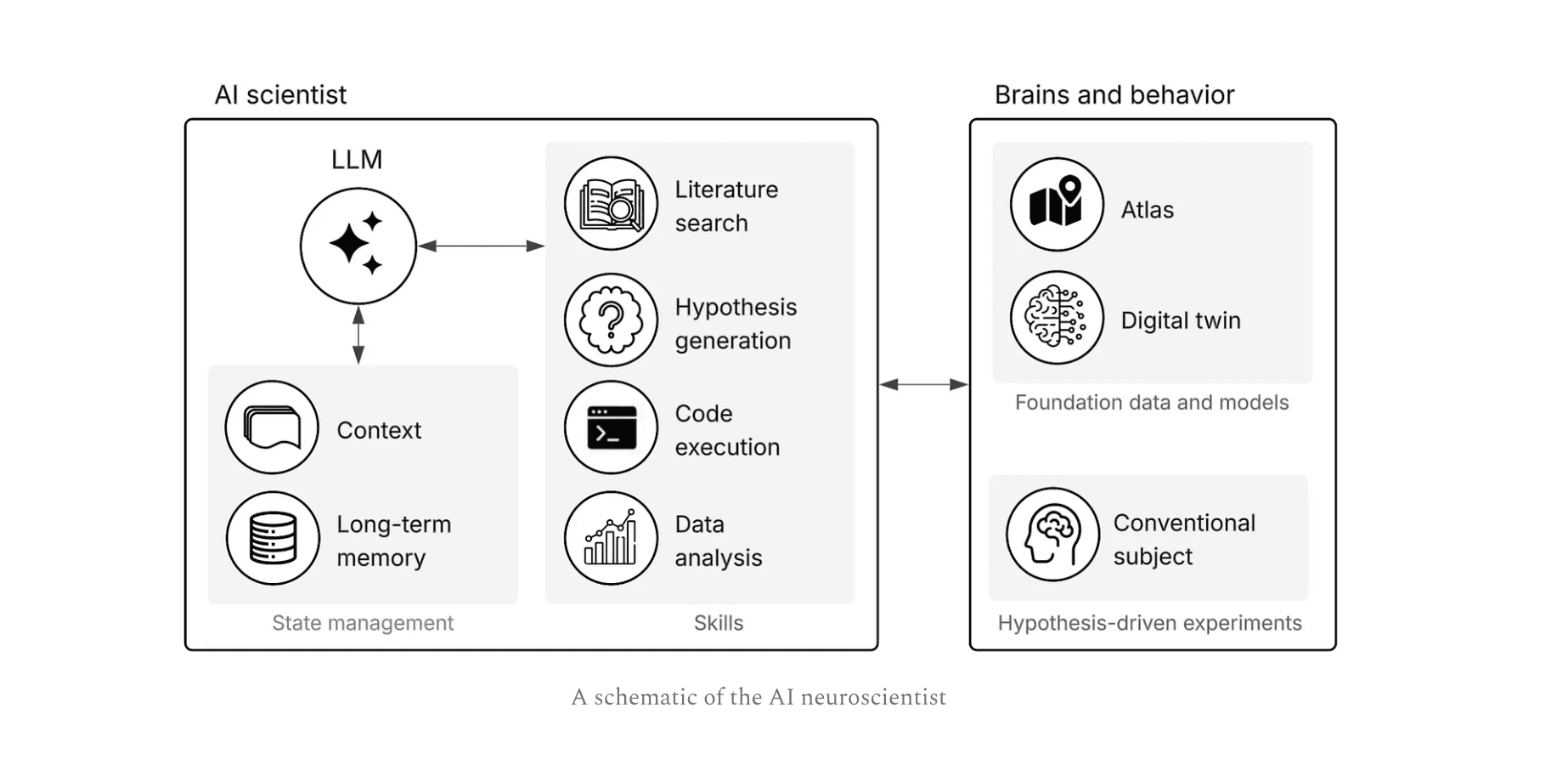
Literature, hypotheses, code, and analysis in one loop.
Faster writing
Stricter autocomplete and quicker inline edits.
Voice typing
Speak methods, results, and equations into structured LaTeX.
Student plan
Verified students at $8/month, half of Pro.
How Auto Scientist fits together
Week by week
Dated notes from June 12 onwards, including one early release each week through 27 Oct.
Next week
Discuss a paper with your lab.
27 Oct
September–October wave
Early release doneThe weekly early-release set is live: thematic analysis, Cell2Sentence, biological tools, conference locales, trending papers, plagiarism check, and travel grants.
20 Oct
Research tools wrap-up
Early release doneBiological tools hub, Cell2Sentence, and AlphaFold stay in one place for biology papers.
13 Oct
Bibby Fellowship travel grants
Early release donePro members can apply for up to $800 for SfN, NeurIPS, and other conferences.
6 Oct
Plagiarism detector
Early release doneOverlap check against published papers and preprints. Included with Pro.
29 Sep
Trending papers
Early release doneHugging Face Daily Papers. Open any paper in paperclub.
22 Sep
Conference deadlines, more locales
Early release doneJapanese and Spanish trackers, plus AI, NLP, CV, and ML field pages.
15 Sep
Biological tools hub
Early release doneAlphaFold viewer and Cell2Sentence together for biology papers.
8 Sep
Cell2Sentence
Early release donePaste gene counts, get a cell sentence and a cell-type call. Runs in the browser.
1 Sep
LLM Thematic Analysis
Early release doneMulti-run qualitative coding with Cohen’s Kappa and cosine similarity. Bring your own API key. Built with Aza Lab at Yale.
Ongoing
Guides and blog posts
Field-specific LaTeX tutorials and cheatsheets.
24 Jul
Scientific search
Search preprints, journals, and datasets. Answers come with citations.
17 Jul
Regulatory lookup
Questions answered from FDA, EMA, and WHO documents.
10 Jul
Data analysis
Upload a dataset. Get summaries and charts for the paper.
4 Jul
Agent, slides, posters
Beamer decks and posters from a paper. Paper Review, Zotero, EndNote, command palette.
Delayed
Code execution
Run Python and R in the editor. Moved off 3 Jul while agent work finishes.
26 Jun
Literature review
Scan sources and draft a related-work section in the editor.
21 Jun
Tools and labs
Image to LaTeX, lab search, stricter citations.
19 Jun
Hypothesis search
Testable hypotheses from your notes and papers, with citations.
12 Jun
Editor redesign
New editor and dashboard layout.
31 May
Writing styles
Concise, scholarly, conversational, or formal tone.
31 May
Claude for writing
Claude as a writing model for research papers.
17 May
Lab websites
Generate a lab site: team, papers, projects, open positions.
3 May
Choose a model
Gemini or Claude. We do not use OpenAI.
26 Apr
Paper to GitHub site
Public academic page for a paper.
19 Apr
Journal formatting
Reformat from journal author guidelines.
12 Apr
LaTeX and Word
Convert between LaTeX and Word with equations kept.
12 Apr
More templates
Extra research templates, including generated outlines.
5 Apr
Chinese and Spanish
Interface in Simplified Chinese and Spanish.
29 Mar
TikZ diagrams
Describe a figure, get TikZ code.
25 Mar
Bibby Figures
Academic diagrams in the document.
25 Mar
Learn LaTeX
Interactive course for researchers.
25 Mar
Product Hunt
Public launch on Product Hunt.
22 Mar
UI and tutorials
Cleaner editor. YouTube walkthroughs.
15 Mar
Cheatsheets
Tutorials and LaTeX cheatsheets.
8 Mar
Citations
Search real papers and insert verified references.
Earlier in the product
Shipped before the weekly notes above.
Photos, handwriting, and scans to LaTeX.
Find labs worldwide. Add your own university.
Stricter checks on references in the editor.
Turn writing suggestions on or off in the menu.
Select text to paraphrase, shorten, or expand.
Keep LaTeX under version control.
Browse saves and restore a previous version.
Switch between rich text and raw LaTeX.
Read-only link. No account needed to view.
Words and characters in a LaTeX file.
Export with formatting and equations.
Resumes, papers, books, and journal formats.
Course for researchers.
Vim keybindings in the editor.
Downloadable LaTeX cheatsheet from projects.